2.0.0 Biggest Release Ever – AI Crawling, MCP, 100+ extra checks, CLI, crawl comparison, auto updating and more and more!
32 minutes ago 4 min read0 comment
Share
BeamUsUp SEO Crawler 2.0 is out, and it’s the biggest update the crawler has ever had. It runs more than 100 new checks, explains every problem in plain English, handles sites with 100,000+ pages, can see JavaScript-built pages the way Google does, and shows you which AI tools (ChatGPT, Claude, Perplexity, Gemini and more) are allowed to read your site. And it’s still completely free.
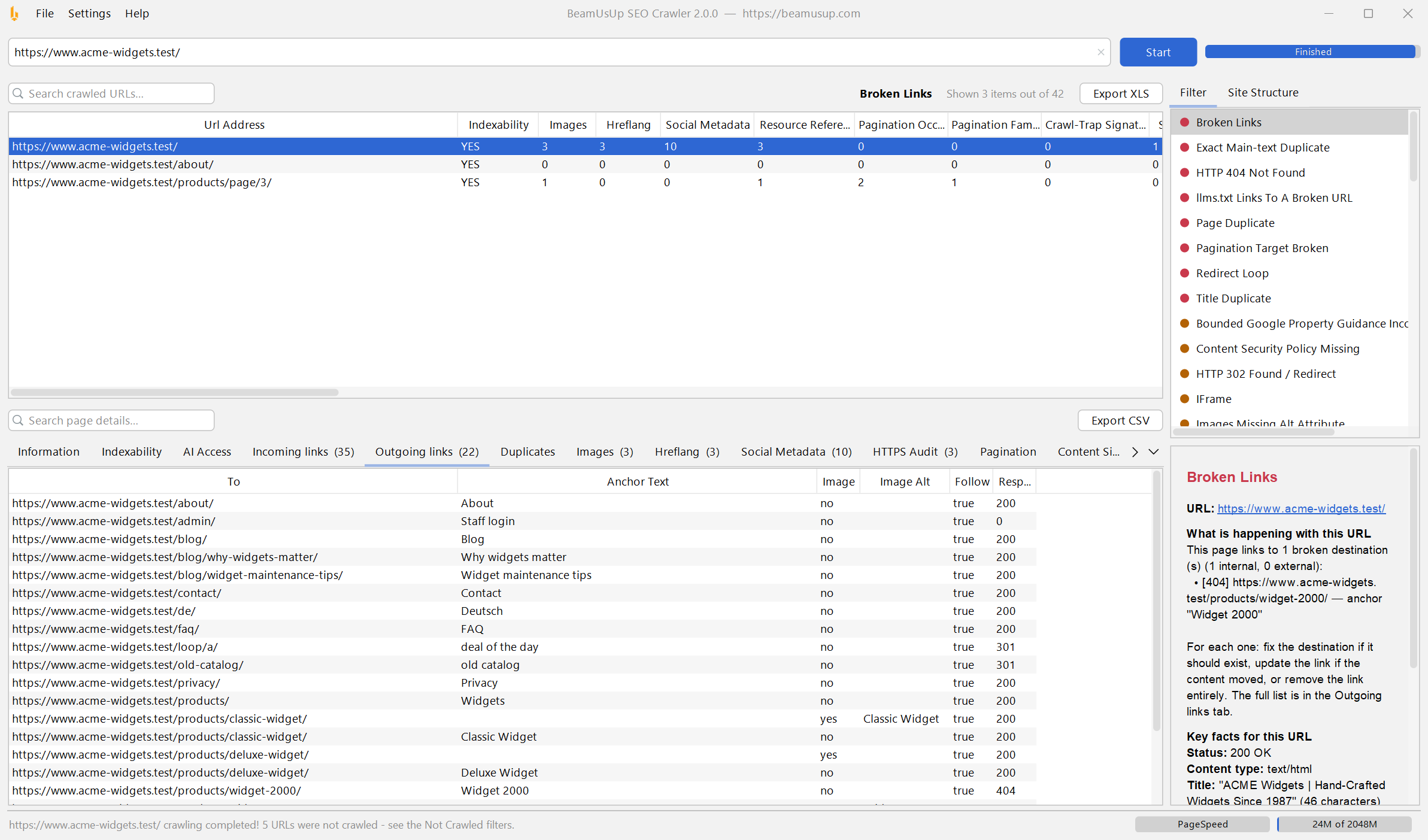
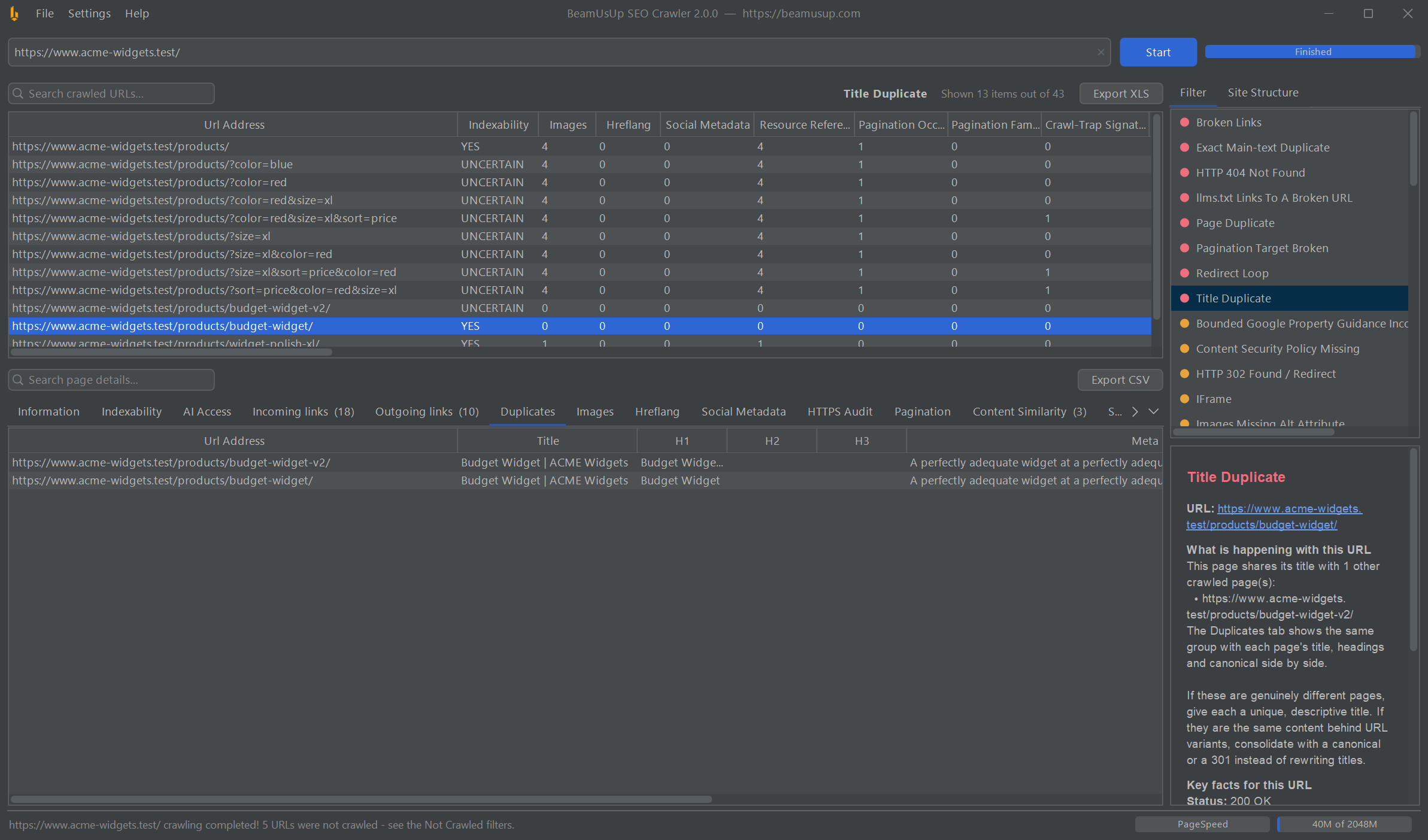
BeamUsUp 2.0 after a crawl: pick a problem on the right, click a page, and the help panel explains what’s wrong and how to fix it. (Click any screenshot to see it full size.)
Windows on ARM, Linux on ARM and every other version are on the download page.
Installing is much easier now
No Java needed. You no longer have to install Java first, on any computer. The installer sets up everything BeamUsUp needs.
A proper Mac installer. The Mac installer is signed and notarized, so macOS opens it normally. The old workaround guide isn’t needed any more.
Automatic updates. BeamUsUp now keeps itself up to date. When a new version comes out, you get it the next time you open the app. (You can switch this off during installation.)
Connects to your AI apps. Leave Install AI Integrations ticked and the installer adds BeamUsUp to the AI assistants it finds on your computer. More on that below.
Upgrading from 1.4? On Windows, uninstall the old BeamUsUp Crawler first (Settings → Apps → Installed apps). On Mac and Linux, just delete the old buu.jar. Your settings and saved crawls live in a separate folder, so they won’t be deleted.
Windows tip: if a blue “Windows protected your PC” box appears, click More info and then Run anyway. Windows shows this for new downloads it hasn’t seen many times yet.
Need support?
Leave a comment on this post with your real email address and real URL, and I’ll get back to you.
What’s new in 2.0
There’s a lot, so here’s the short version. Click any item to jump to the details.
Want every last detail? The full user guide walks through every screen, setting and check.
See your site the way AI tools see it
More and more people ask ChatGPT, Claude, Perplexity or Google’s AI answers instead of clicking through search results. BeamUsUp 2.0 shows you whether those tools can actually read your site, and spots the mistakes that quietly lock them out.
The new AI Access tab
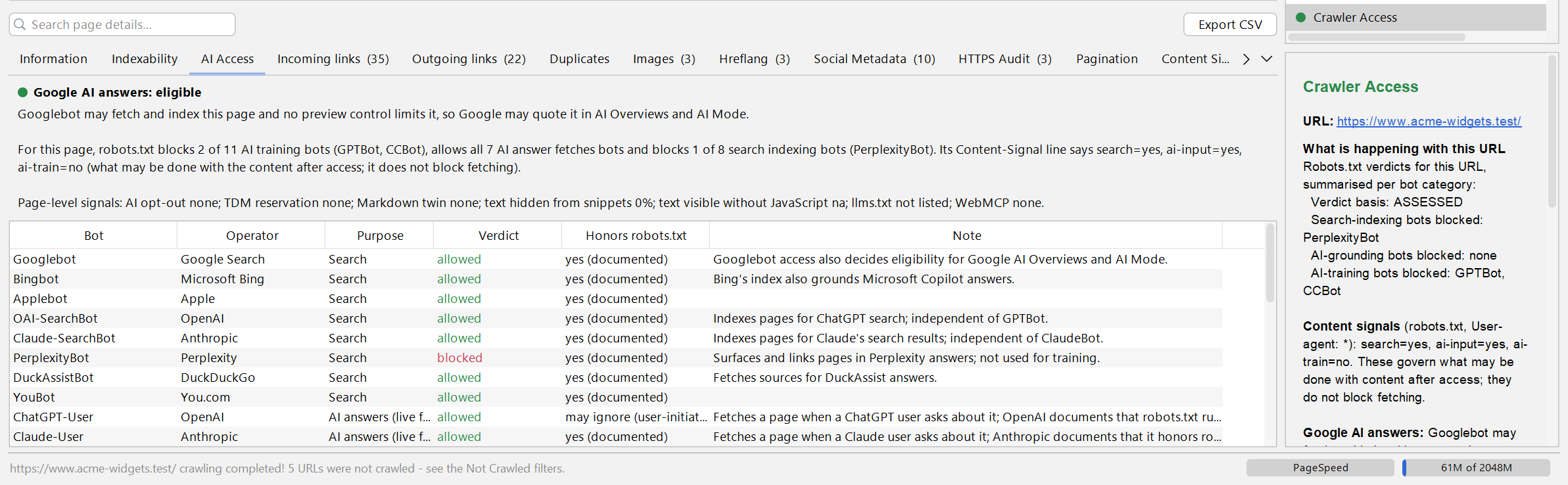
Click any page in your results and open the AI Access tab. At the top it tells you whether Google can use the page in its AI answers, such as AI Overviews. Below that it lists 27 search engines and AI bots, from Googlebot and Bingbot to OpenAI’s GPTBot, ClaudeBot and PerplexityBot, and shows which ones your robots.txt lets in and which it keeps out.
The new AI Access tab: can Google use this page in AI answers, and which of 27 bots may read it?
The bots are grouped by what they actually do, which matters more than most people realise:
Search bots add your pages to search engines, including AI search such as ChatGPT search. Block them and you can’t appear there.
AI assistant bots fetch a page when someone asks an AI assistant about it.
AI training bots collect content to train future AI models.
To see the list, turn on Audit crawler access in Settings → Crawl Settings → Analysis.
It catches the robots.txt mistakes that cost you AI traffic
Blocking AI search bots while still letting AI training bots take your content: the worst of both worlds.
A blanket “block all AI” rule that also removes you from AI search results and citations.
Accidentally blocking a search engine from your whole site.
Old bot names that no longer work, so the block you think you have does nothing.
Crawl-delay rules, which Google ignores.
A robots.txt file too big for Google to read to the end (over 500 KB).
Content Signals
BeamUsUp also reads the Content-Signal lines that Cloudflare and some sites now add to robots.txt. They tell AI companies what they may do with your content once they have it: show it in search results, use it in AI answers, or train AI on it. BeamUsUp checks that they’re written correctly and don’t contradict each other.
llms.txt: checked, and drafted for you
llms.txt is a proposed file that gives AI tools a neat list of your most important pages. Turn on Audit llms.txt and BeamUsUp checks yours against the official format and tests every link in it, flagging pages that are broken, redirected, set to noindex, hidden from AI bots or behind a login. Don’t have one yet? File → Export llms.txt Draft writes a first draft from your crawl.
An honest note: right now no major AI search or training bot actually fetches llms.txt. The tools that do read it are mostly AI coding assistants and documentation tools, so don’t expect it to bring you traffic on its own. If you do have one, BeamUsUp makes sure it’s correct.
AI signals on every page
For each page, BeamUsUp also checks the smaller signals: “noai” and TDM opt-out tags, text hidden from Google’s snippets, Markdown versions of pages made for AI tools, and (with JavaScript rendering on) content that only appears after JavaScript runs, which many AI crawlers never see.
Crawl JavaScript websites
Many modern websites send the browser an almost empty page and then build the content with JavaScript. A normal crawler only sees that empty page. Google runs the JavaScript and sees the finished page.
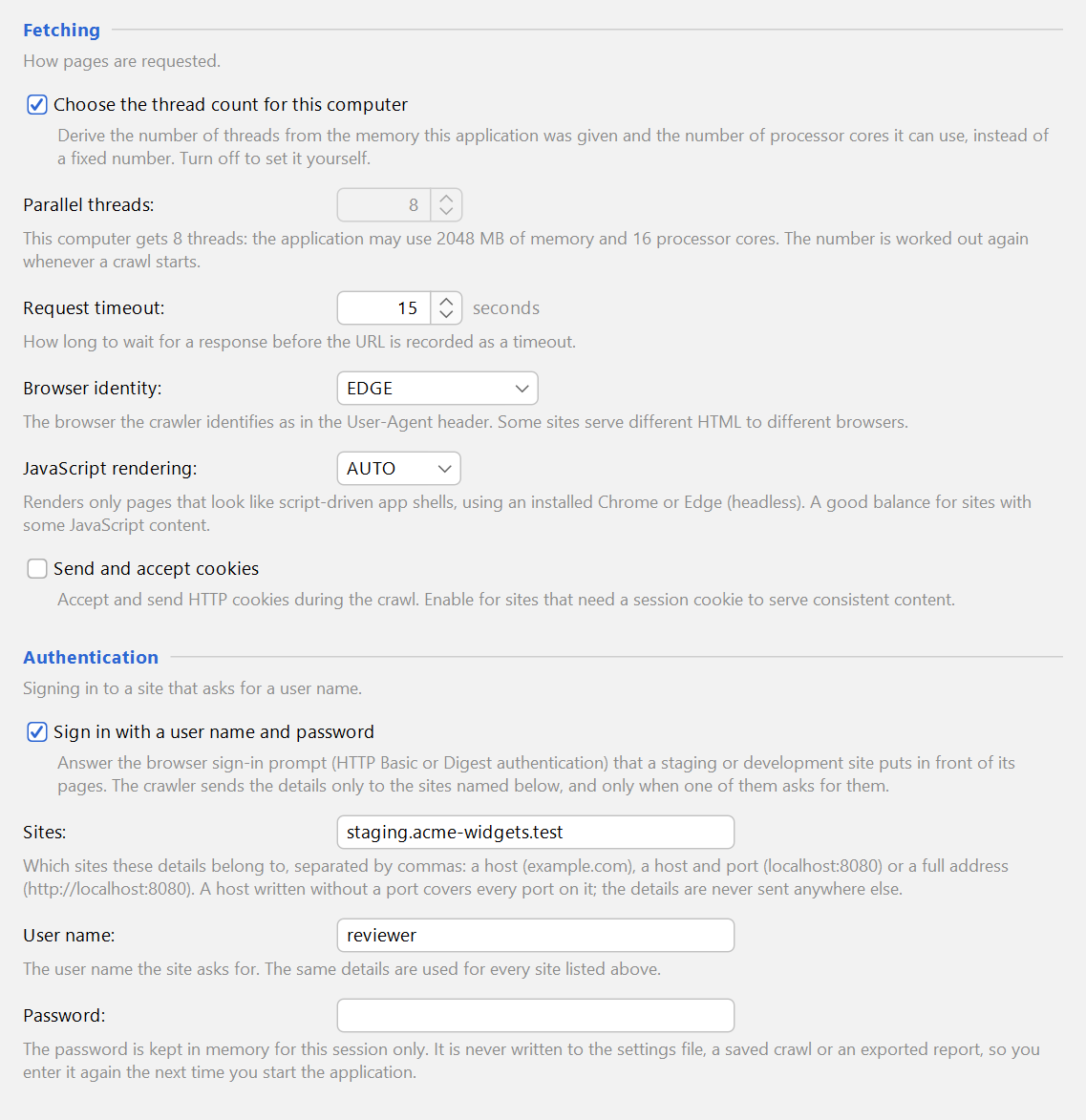
BeamUsUp 2.0 can now do the same, using the Chrome or Edge browser already on your computer, so there’s nothing extra to download. In Settings → Crawl Settings → Crawling, set JavaScript rendering to:
NEVER (the default): the fastest. Right for classic websites, including most WordPress sites.
AUTO: only renders pages that look like they’re built with JavaScript. A good balance.
ALWAYS: renders every page. The slowest, but the most complete.
Settings → Crawl Settings → Crawling: JavaScript rendering, the automatic thread count and sign-in details for a password-protected site, each with a plain-English explanation.
The best part: BeamUsUp compares the raw page with the finished page and flags anything that changes, such as the title, description, canonical, links, main text or structured data. If something important only appears after JavaScript runs, you’ll know about it.
Compare two crawls
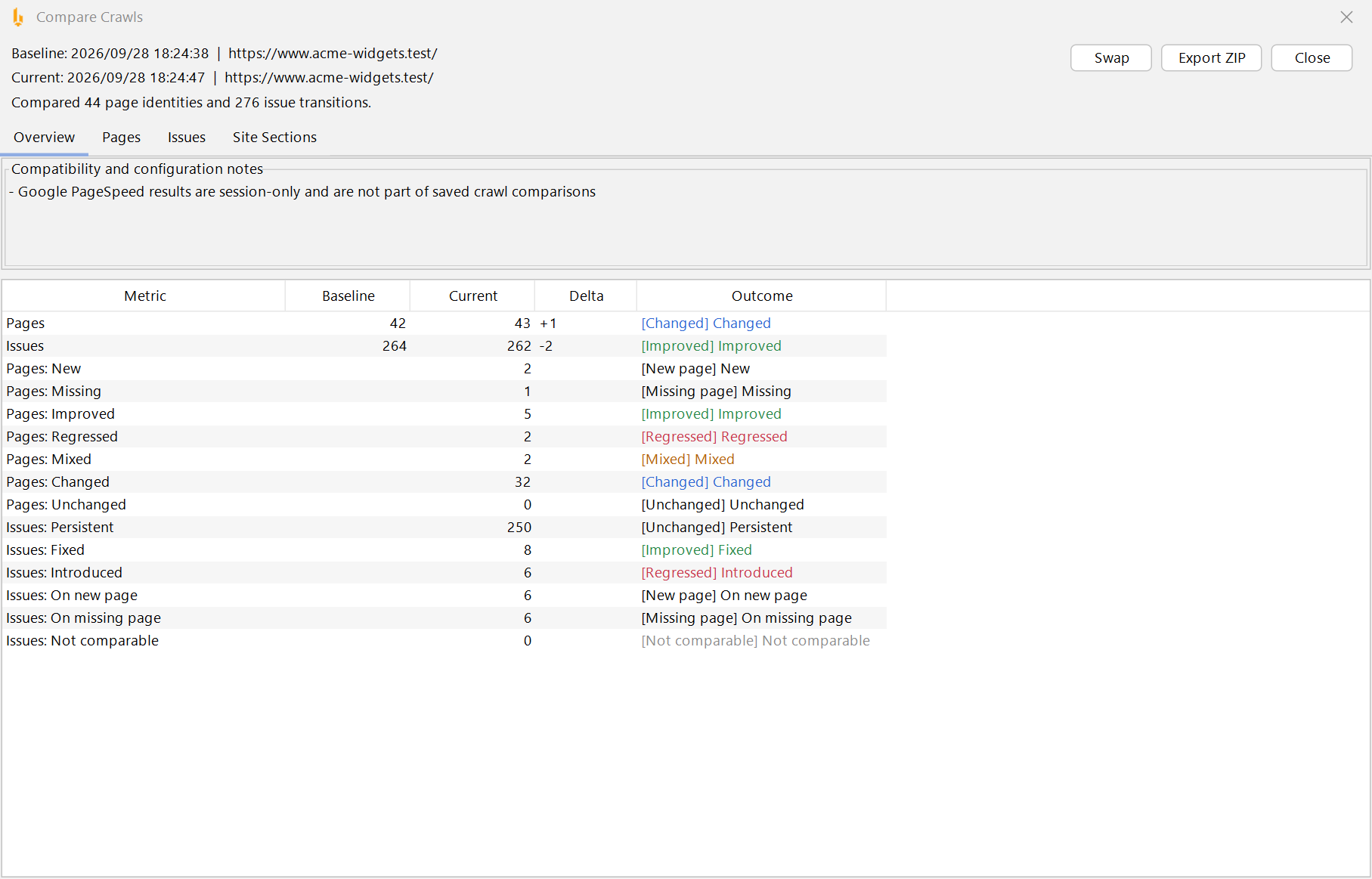
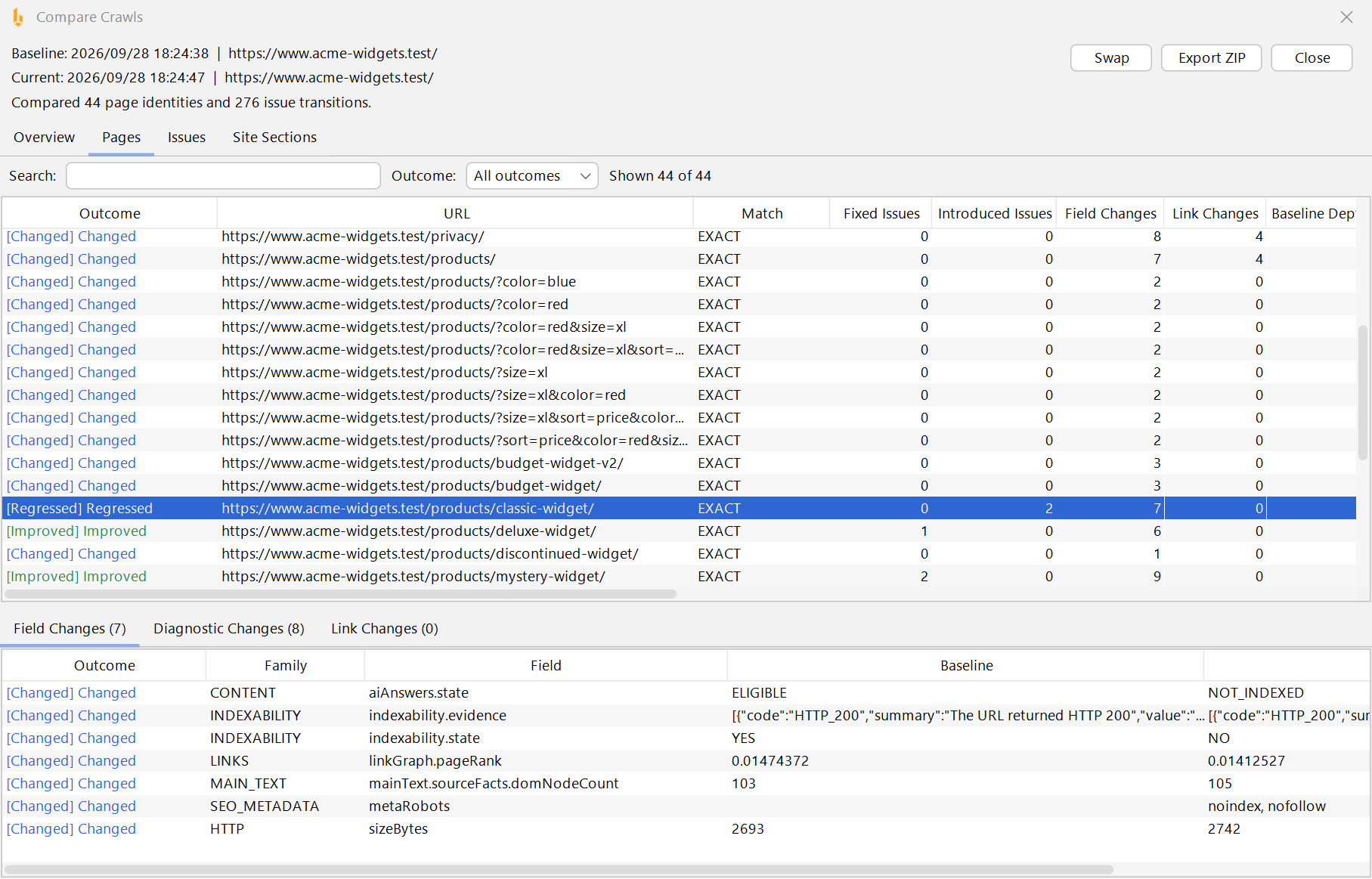
Fixed a batch of problems and want proof? Moved to a new site and want to check nothing broke? File → Compare Crawls lets you pick two crawls of the same site and shows you:
Which problems were fixed, which are new and which are still there
Pages that are new since last time, and pages that have gone missing
Exactly what changed on each page: title, description, status code, links, broken links and more
A breakdown by section of your site, such as /blog/ or /shop/
Compare Crawls, Overview: how many pages and problems got better or worse between two crawls.Compare Crawls, Pages: this product page stopped being indexable because a noindex tag appeared. Exactly the kind of accident you want to catch early.
You can export the whole comparison as spreadsheets (CSV files in a ZIP) to send to a client or your team. Headers that change on every visit, such as the date, are ignored, so a site that hasn’t changed shows as unchanged. Comparing works with crawls made with version 2.0 or later. Tip: use the same settings for both crawls. If they differ, BeamUsUp will tell you the problem counts can’t be compared fairly.
More than 100 new SEO checks
Every new check appears in the Filter list, and many have their own tab for the page you’ve selected. Here’s what’s covered:
Broken links you can trust. Internal links are checked against what each page really returned, and external links are now genuinely checked (turn on Check external link status).
Redirect chains and loops. See every step of a redirect, and catch real loops (page A → page B → page A) that trap visitors and search engines.
Smarter duplicates. Duplicate titles, duplicate meta descriptions, and pages with the same title and headings. Smart mode ignores pages that correctly point to one main version with a canonical tag.
Duplicate content. Finds pages whose main text is identical or nearly identical, ignoring menus, sidebars and footers. See them in the Content Similarity tab.
Images. Missing or empty alt text, missing width and height, missing image sources, and lazy-loading settings that are missing or wrong. (Images tab)
Schema markup. Finds JSON-LD, Microdata and RDFa, reports broken JSON-LD, and checks Product, Breadcrumb and WebSite markup against Google’s rich-result guidelines. (Structured Data tab)
Hreflang for multi-language sites. Wrong language codes, missing return links, conflicting targets and more. (Hreflang tab)
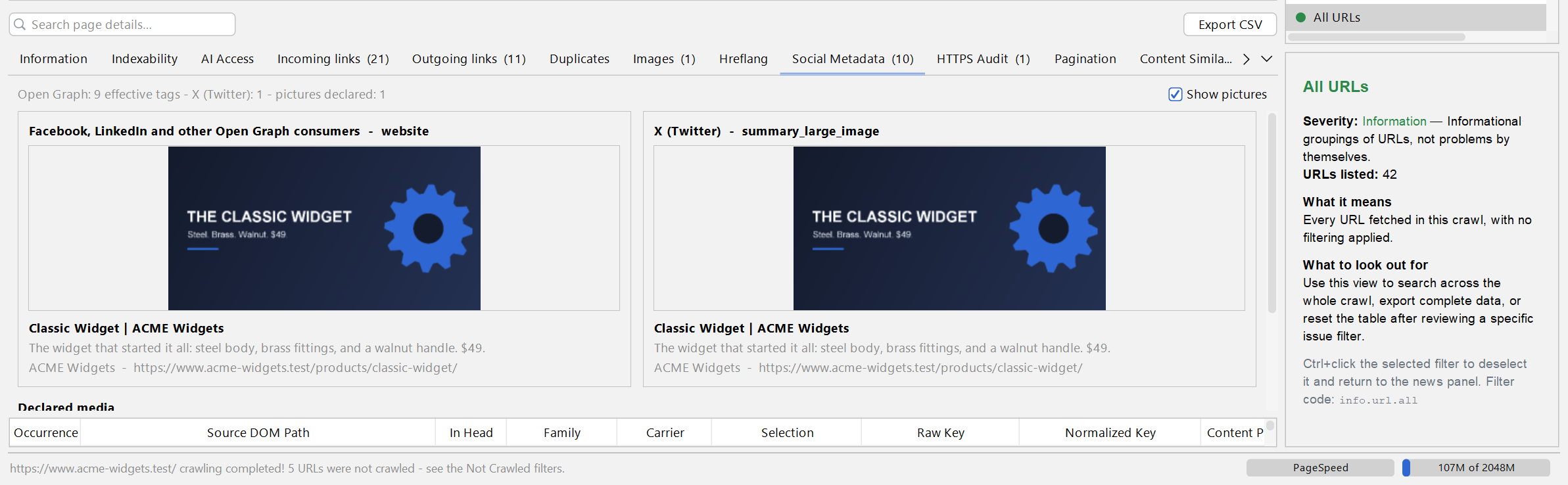
Social sharing previews. Checks your Open Graph and X (Twitter) tags, and the Social Metadata tab shows a preview of how the page looks when it’s shared on Facebook, LinkedIn and X.
HTTPS and mixed content. Finds http:// images and scripts on https pages, forms that send data over plain http, and redirects that drop visitors from https back to http. (HTTPS Audit tab)
XML sitemap audit. Broken sitemap files, dates in the future, and sitemap URLs that redirect, return errors, are set to noindex, point elsewhere with a canonical, or are blocked by robots.txt.
Orphan pages. Turn on Seed the crawl with sitemap URLs and BeamUsUp also crawls the pages listed in your sitemap, then flags any that no other page links to. Search engines struggle to find and value those.
Pagination and crawl traps. Spots filter and sorting URLs that multiply into endless variations and waste Google’s time, plus pagination mistakes such as page 2 pointing its canonical at page 1. (Pagination tab)
Security headers (optional). Checks for three headers that protect your visitors: Content-Security-Policy, Strict-Transport-Security (HSTS) and X-Frame-Options.
Accessibility basics. Headings that skip a level (an H2 followed straight by an H4), and pages with no <main> content area or more than one.
The Social Metadata tab shows how a page will look when it’s shared on Facebook, LinkedIn and X.
Plain-English explanations for everything
Version 1.4 told you what was wrong. Version 2.0 also tells you why it matters and how to fix it.
A built-in help panel. Click any issue in the Filter list and the panel at the bottom right explains what it means, why it matters and what to do about it. Click a single URL and you get a diagnosis for that exact page: where its redirect goes, which pages share its duplicate title, which of its links are broken, and so on.
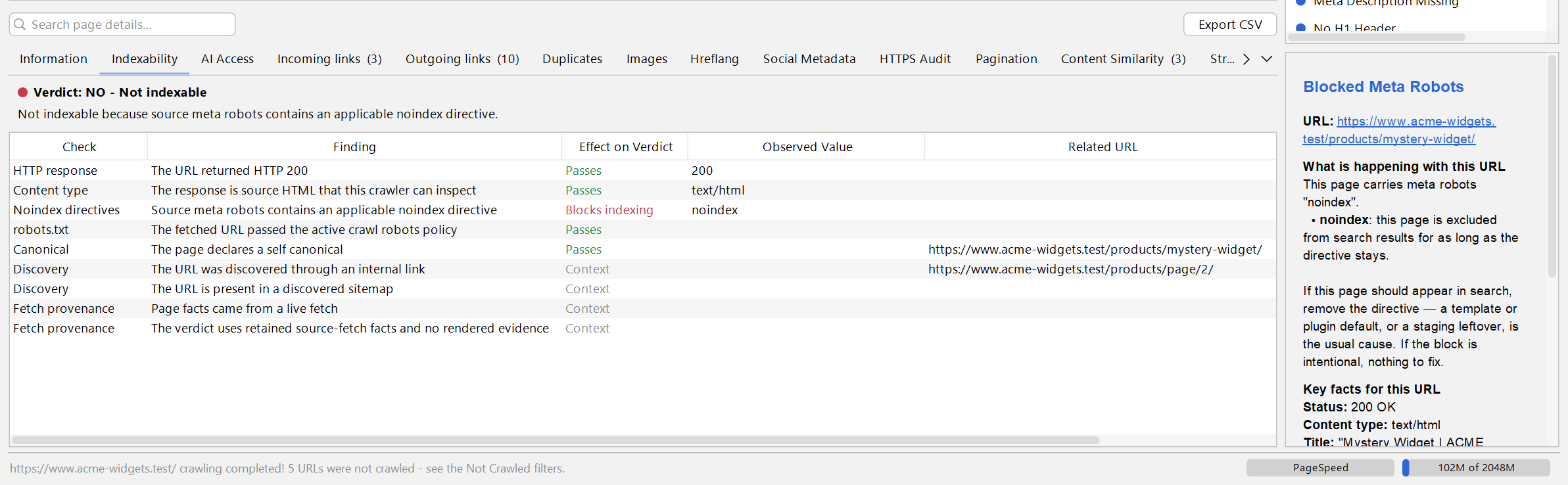
A new Indexability tab. Every page gets a Yes, No or Uncertain verdict on whether Google can index it, plus every reason behind that verdict: noindex tags, a canonical pointing somewhere else, robots.txt blocks, redirects, errors. Each reason is labelled with its effect, so you can see at a glance which one is blocking the page.
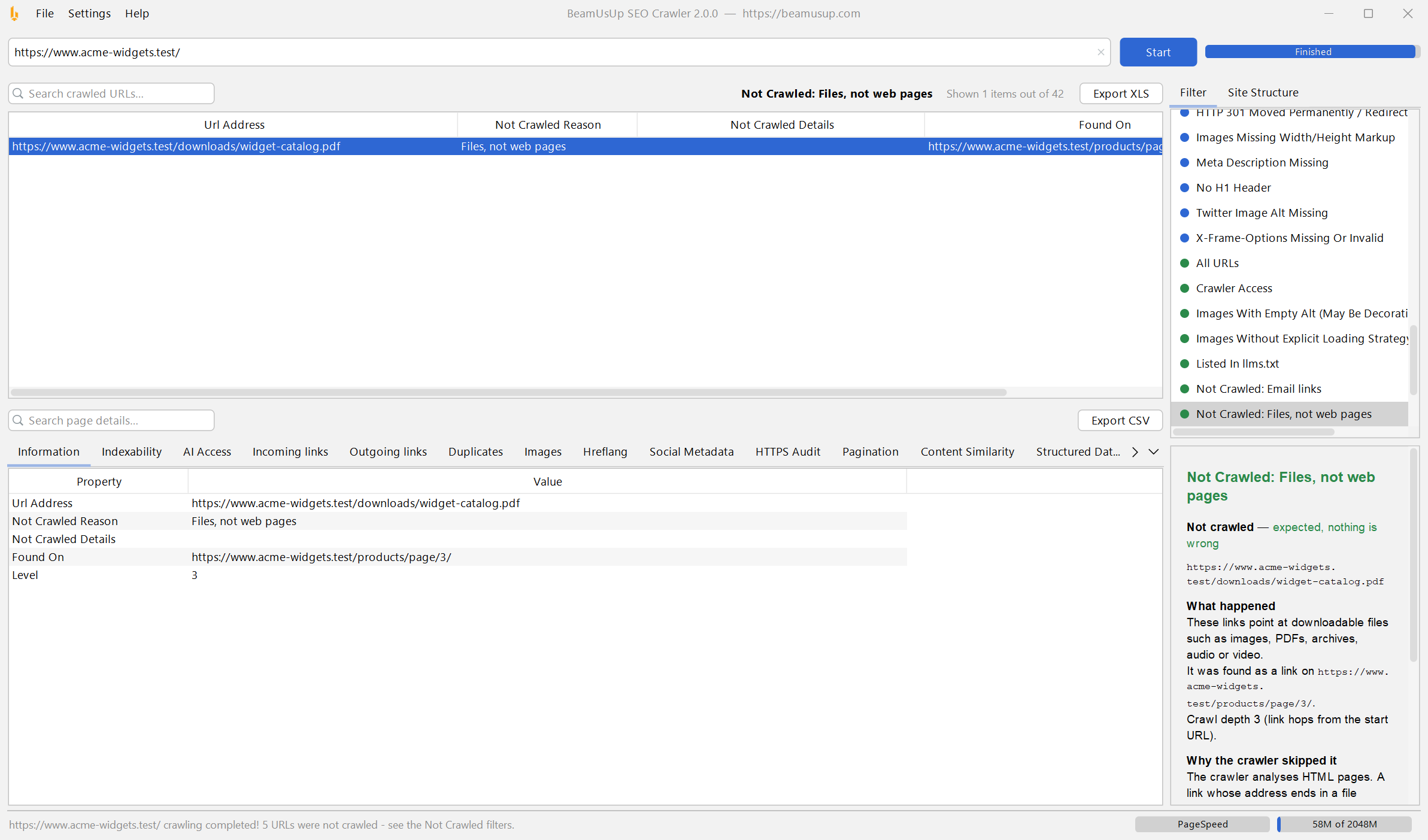
“Not Crawled” filters. URLs the crawler skipped are grouped by reason: links outside your site or the folder you chose, files such as PDFs and images, email, phone and JavaScript links, broken link code, and robots.txt or sitemap files that couldn’t be read. Each group explains what happened, whether it matters and what you can do, and shows the page where each link was found.
Clearer settings. Every option in the Settings window now has a short explanation underneath it, and column headers and buttons show tooltips when you hover over them.
The Indexability tab gives every page a verdict and lists each reason behind it.A Not Crawled filter: what was skipped, where the link was found, and whether you need to do anything about it.
PageSpeed, now with Core Web Vitals
The free Google PageSpeed check that arrived in 1.4 now brings back much more than four scores:
Core Web Vitals from real visitors. How fast the main content appears (LCP), how quickly the page reacts to clicks and taps (INP) and how much the layout jumps around while loading (CLS), as measured by Google from real Chrome users, for the page and for your whole site.
Lab measurements from Google’s Lighthouse test, for mobile and desktop.
The audits that failed and the biggest opportunities, so you know what to fix first.
It’s all in the PageSpeed tab and in your Excel export, and it uses the same free API key as before. (Google only has real-visitor data for pages and sites with enough traffic, so smaller sites may only see the lab results.)
Built for big sites
100,000+ pages. Large parts of the crawler were rebuilt so crawled pages are stored on disk and only what’s needed stays in memory. In our tests, a 100,000-page crawl finished in one go and used about 1.5 GB of memory at its peak.
It sizes itself to your computer. BeamUsUp can now use up to half of your computer’s memory when a crawl needs it (the old Windows version was stuck at 1 GB), and it picks the right number of crawling threads for your machine automatically.
No more out-of-memory crashes. If a crawl gets too big for your computer, BeamUsUp first frees up memory. If that’s not enough, it stops the crawl cleanly, keeps everything it has crawled, still runs the full analysis and tells you what happened.
One limit remains: the Excel export holds up to 65,536 rows per sheet, and BeamUsUp tells you before you export if a crawl is bigger than that.
Crawl sites you couldn’t before
Password-protected sites. Staging and development sites often pop up your browser’s own username and password box. Add the details in Settings → Crawl Settings → Crawling → Authentication and BeamUsUp signs in for you. The password is only kept in memory while the app is open and is never saved. (This works for that browser pop-up, not for login forms on a web page.)
Local sites on any port. Crawl development sites such as localhost:3000. Each port now counts as its own site, so two projects running on the same computer never get mixed up.
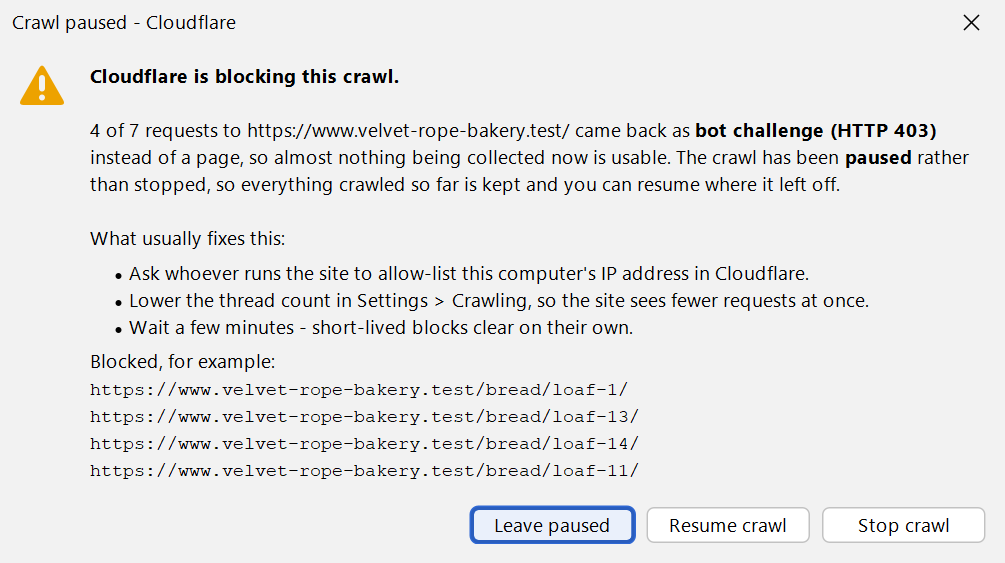
Cloudflare and bot-protection alerts. When a site’s protection (Cloudflare, Akamai, Imperva, Sucuri, AWS and others) starts blocking the crawler, BeamUsUp pauses the crawl and tells you who is blocking it and what usually helps: getting your IP address allow-listed, using fewer threads, or waiting a while. No more crawls that quietly fill up with blocked pages. It also recognises Cloudflare’s “pay per crawl” responses.
Secure by default. SSL certificates are now checked properly, so an expired or invalid certificate shows up as a problem instead of being silently accepted.
When Cloudflare starts blocking the crawler, BeamUsUp pauses and tells you what usually fixes it.
Ask an AI assistant to crawl your site
BeamUsUp 2.0 plugs straight into AI assistants through MCP (Model Context Protocol), an open standard for connecting tools to AI apps. When you install BeamUsUp, leave Install AI Integrations ticked: the installer adds BeamUsUp to the AI apps it finds on your computer, such as Claude, Cursor, VS Code, Windsurf, Codex CLI and Gemini CLI. Restart your AI app, then just ask:
“Crawl example.com and tell me the five things I should fix first.”
“Which pages have duplicate titles? Suggest better ones.”
“Is my robots.txt blocking any AI search bots?”
The assistant runs a real crawl with BeamUsUp and answers from the actual results instead of guessing. It can pause, resume and stop crawls, dig into any single page, and reopen earlier crawls. Using an AI app the installer didn’t find? The user guide shows how to add BeamUsUp to it by hand.
A fresh new look
The whole app has been redesigned: a cleaner, more modern look in both the Light and Dark themes, simpler menus (File, Settings, Help), a tidy Settings window with three tabs (Crawling, Analysis and Advanced), coloured severity dots and counts in the Filter list, and striped tables that are easier to read.
The redesigned app in the Dark theme.
For developers: a command-line mode
BeamUsUp can now run without its window. The installer adds a beamusup-crawl command, and every release also comes with a standalone .jar file for servers. It crawls a site, writes a detailed JSON report and can fail with an error code when it finds problems at the level you choose, which makes it easy to schedule regular crawls or add an SEO check to a website’s deployment pipeline:
The desktop app, the command line and the AI assistant connection all use the same crawling engine, so their results match. Every option is in the user guide.
Bug fixes
2.0 also fixes a long list of problems from 1.4. The most important ones:
Running a PageSpeed check on the rows you selected now checks those rows. 1.4 checked the same number of rows from the top of the table instead.
The “blocked by robots.txt” check was back to front: it flagged pages that robots.txt allowed. It’s now correct, and it shows the pages that link to each blocked URL.
The option to check external links didn’t actually check anything. Now it does.
Broken internal links could be missed. They’re now checked after the crawl finishes, when every page’s result is known.
Some crawl settings were ignored, including “Crawl outside the starting folder”. They now work.
Crawling subdomains now includes the main domain too.
robots.txt is now read separately for each subdomain and for www, the same way search engines do it.
Every kind of redirect is now followed correctly, including 303, 307, 308 and relative redirects.
Pages that time out are reported instead of vanishing from the results.
Sitemaps are still found when robots.txt doesn’t mention one.
Searching your crawled URLs now finds text anywhere in the address, in upper or lower case. 1.4 skipped the start of every URL, so searching for your own domain found nothing.
Your thread count and timeout settings are now remembered after a restart.
H3 headings are no longer lost when you resume a crawl.
Pause now takes effect straight away, instead of after up to 200 more URLs.
The app no longer hangs at startup when the news feed is slow, and no longer crashes on a fresh install.
That’s BeamUsUp 2.0. Download it, crawl your site, and tell me in the comments what you find and what you’d like to see next!


Add comment
Related
1.4.0 Major Release – Google Pagespeed Scores!
2 years ago
This is an old version New version is here Need Support? Reply to a comment ...
Get a Google Pagespeed API Key
2 years ago
To enable bulk google pagespeed collection in BeamUsUp you’ll need an API key so here ...
Beam Us Up Crawler Updated v1.3.0 – New features & Fixes
2 years ago
Download Windows, Mac or Linux Remember you need Java installed for Mac & Linux. As well as to ...
Beam Us Up Crawler Updated v1.2.1 – Big Feature Update
2 years ago
Download Windows, Mac or Linux Remember you need Java installed for Mac (how to run on mac guide) ...